 Star
Star
BleachBit 6.0.0 is our biggest release in years, featuring significant new features, deeper browser cleaning, and many usability and safety improvements. Key highlights include a new cookie manager, improved browser cleaning for Chromium and Firefox, new Vivaldi and Zen browser cleaners, and numerous interface enhancements. This release represents months of development work with over 100 improvements and fixes.
Changes since version 5.0.2
All Platforms
New Features
- Cookie manager: A new cookie manager lets you choose which cookies to keep when cleaning Chromium- and Firefox-based browsers.
- New browser support: Added cleaners for the Vivaldi and Zen web browsers.
- Deeper browser cleaning (Chromium-based, including Google Chrome): Now cleans component cache, extension cache, Graphite Dawn cache, shader cache, DIPS, crash reports, code cache, media device salts, reporting data, IndexedDB, network state, and search suggestions. Additional databases are vacuumed and cache handling is improved for snap and Flatpak installations.
- Deeper browser cleaning (Firefox, LibreWolf, Waterfox): Now cleans storage, permissions, bounce tracking protection, site security state, alternate services, favicons, and session backups. Cache handling is also improved for snap and Flatpak installations.
- Major improvements to Opera cleaning.
- Reorganized browser options: Firefox and Chromium-based browser options have been reorganized under a clearer "Site data" category.
- Improved session option descriptions for web browsers.
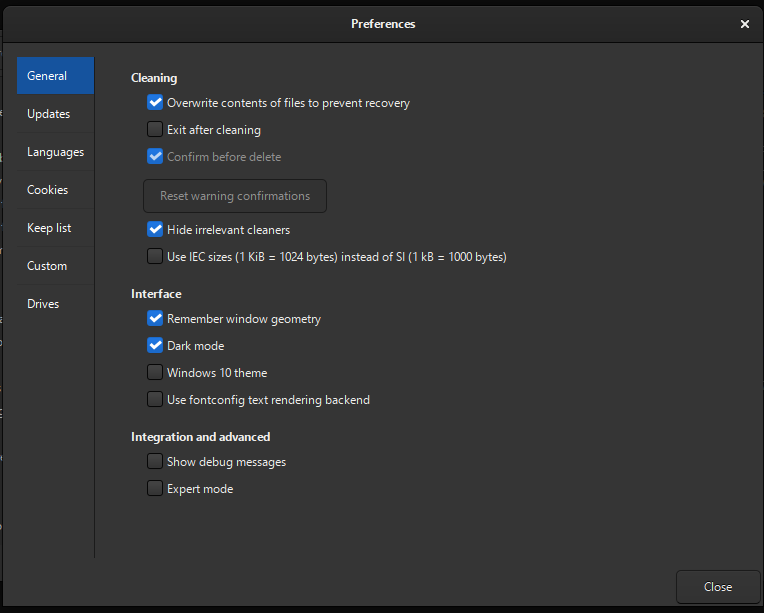
- Expert mode: A new Expert Mode option adds safety guardrails for less experienced users by restricting advanced operations. Users upgrading from versions older than 5.1.0 may need to enable expert mode to access all features that previously did not have guardrails. 🦺
- CLI negation support: The command-line interface now supports negation. See the CLI documentation for details.
- Paste paths from clipboard: Press
Ctrl+Vin the main window to paste files for shredding. Previously, only files copied from a file manager were accepted; now plain text paths (e.g., copied from Notepad) are also supported. - Chaff improvements: Faster chaff generation, flexible stop conditions (file count, total size, free space percentage), a stop button, and a completion message. The UI no longer freezes while downloading chaff data.
User Interface
- Remember warning choices: You can now opt out of future confirmations directly from the confirmation dialog. (Requires expert mode. 🦺)
- Skip preview when deletion confirmation is disabled. (Requires expert mode. 🦺)
- Custom paths: Visual cues now distinguish custom paths from the allowlist. A context menu makes it easy to manage custom paths. A warning is shown if a protected path is added, which can be bypassed in expert mode. 🦺
- Improved preferences dialog appearance and layout.
- System Information dialog: Added a button to anonymize system information before sharing.
- Improved dark theme contrast for error log text.
- Improved tree view for expert mode: When expert mode is disabled, a warning icon appears next to options that have warnings (such as deleting browser passwords). Toggling these protected options is blocked, and an info bar explains how to enable expert mode. 🦺
- Clarified Chromium sync cleaning: In Chromium-based browsers, cleaning sync data will delete web apps. If the browser syncs to the cloud, web app data can be restored.
- Renamed "overwrite free space" to "wipe empty space" for clarity, with an elaborated warning message. Also, BleachBit now helps users delete orphaned wipe files if the process is interrupted. 🦺
- Renamed "whitelist" to "allowlist" throughout the application for clearer, more descriptive terminology that directly communicates function. 🦺
- Info bars replace modal alert dialogs for a smoother, more streamlined experience.
- Locked preferences: Preferences set via the command line (for example,
--gui --no-delete-confirmation --overwrite --debug), are locked in the GUI and not recorded to the configuration file.
Bug Fixes
- Fix: Do not report a file as deleted when access is denied.
- Fix: Do not shred hard links.
- Fix: Avoid an error when cleaning Firefox URL history.
- Fix: Hyperlink from GUI to help/support page.
- Fix:
UnicodeEncodeErrorwhen displaying filenames with special characters. - Fix: GUI deadlock when loading malformed XML cleaner files.
- Fix:
--debugCLI option. - Fix:
--shredis now exclusive as expected. - Fix: Excess whitespace in dialogs.
- Fix: Prevent opening preferences dialog when using
--gui --shredfrom the command line.
The icon 🦺 designates a change to increase safety of your data: using clarity and guardrails to help users make informed decisions and avoid surprises.
Performance
- Improved speed of XML parsing.
- Improved speed of chaff generation.
Localization
- Added many hints for translators.
- Enabled reordering of placeholders.
- Translators updated 71 languages with 6178 changes.
- The most active languages were қазақ тілі (407), български език (328), and 中文 (179).
- New languages added: Central Kurdish and қазақ тілі
Windows
New Features
- Deeper browser cookie cleaning: More cookie locations are now cleaned for Chromium and Brave on Windows, and a new cookie location is supported for Microsoft Edge.
- LibreOffice version 4 cleaning is now supported.
- Windows installer is now localized: The installer can be displayed in your language. If your language is not available, consider contributing a translation.
- Updated code signing timestamp protocol for the Windows installer and application: now using the RFC 3161 timestamp protocol with SHA-256, replacing the Authenticode protocol which used SHA-1.
winregsearch type for CleanerML: Allows cleaning apps installed in a path defined by a Windows registry key.- Winapp2.ini: Added support for exclusion of registry keys (
ExcludeKey#=REG), completing full support for the Winapp2.ini format. - Friendly message when switching user profiles: When the application is started from a standard account and the user elevates privileges using a different account, a notification explains that cleaning user-specific paths (such as browser data) will only affect the elevated account. Tip: Declining the UAC dialog when prompted will run the application with standard permissions, which is a good choice when cleaning only your user profile, unless file overwriting is required.
- Add a warning for the "Update Uninstaller" option in the System cleaner.
- Context menu in Windows Explorer now loads BleachBit faster.
Bug Fixes
- Important fix: Do not follow directory junctions/symlinks in the Recycle Bin. This prevents unintended data loss.
- Fix: Read-only files were not properly deleted.
- Fix: "Access denied" error when getting the size of certain files.
- Fix: Treat "access denied" errors differently than "file locked by another process."
- Fix: Avoid crash when the
SSLKEYLOGFILEenvironment variable is set. - Fix: Avoid crash when run from a folder named
binorlib. - Fix: Application icon appearance.
- Fix: Splash screen appearance is now a simpler design with just the logo and a transparent background.
- Fix: Error on first start with disconnected network drives.
- Fix: Poor contrast with Windows 10 theme.
- Workaround: A new dialog on first launch asks user whether they are experiencing blurry or unreadable fonts, and offers a workaround by switching the font rendering backend. The preference dialog has a new option for toggling the font rendering backend.
Performance & Updates
- Improved speed of overwriting files when running with administrator privileges.
- Improved Windows update cleaning: services are stopped in fewer cases, and unneeded error messages are suppressed.
- Updated bundled libraries: Python 3.12 and GTK 3.24.51.
Linux
New Features
- Flatpak support: Cleaning now works for ungoogled Chromium and Chromium (
org.chromium.Chromium) installed via Flatpak. - LibreOffice: Cleans recent documents on Linux.
- Partition wiping: Calls
fstrimwhen available for more thorough SSD cleaning. - Dark mode warning: Users are now notified that some system themes do not support dark mode.
- New distribution packages:
- Ubuntu 25.10, Ubuntu 26.04
- Linux Mint 22.3
Package Signing
Previously, .deb and .rpm packages were not signed directly and could only be verified using detached signatures or a signed checksum file. Now, these packages are signed with the maintainer's key, giving you three verification options:
- Verify the package signature directly
- Use the detached signature
- Use the signed checksum file
See the installation documentation for details.
Bug Fixes
- Fix: Auto-hide for snap and pacman cleaners.
- Fix:
.inicleaning for the KDE6statercfile. - Fix: Improved the accuracy of estimated completion time for wiping empty space for non-root users.
- Fix: Prevent crash when
xhostis not installed. - Fix: Prevent exception when reading cleaner files with broken character encoding.
- Fix: Regex in
pacman_cache(). - Improved exception handling for yum/dnf.
- Improved error message when the
requestslibrary is missing. - Removed outdated code from the memory cleaner.
Other changes
For Developers
- Package managers: if you maintain your distribution's package for BleachBit, please add dependencies for chardet and requests.
- New Docker-based test system for running automated tests across multiple Linux distributions and environments.
- pytest support introduced for unit testing (alongside existing unittest), including parallel test execution.
- New browser testing site: browsergym.bleachbit.org for testing browser cleaning behavior.
- Major code cleanup and refactoring.
- CleanerML: Added
winregsearch type for registry-defined install paths, andExcludeKey#=REGsupport in Winapp2.ini. - Fix Coveralls integration.
- Added hidden
--no-delete-confirmationCLI argument (for automated testing). - Improved compatibility with pytest.
- List of commits
- List of closed issues
Website & Documentation
- Major improvements to the documentation site at docs.bleachbit.org.
- The first localized pages on bleachbit.org in Spanish, Italian, and German cover the homepage, download, features, and help pages.
Troubleshooting
These is a troubleshooting guide related to changes in 6.0.0.
Delete confirmation displaying even when unchecked in Preferences
Problem: You want to skip the delete confirmation, like you did in BleachBit 5. In the preferences, the delete confirmation option be unchecked, yet it is ignored. Also, the option is disabled, so you cannot toggle it.
Cause: Expert Mode mode guards against hiding warning confirmations.
Solution: Enable Expert Mode to skip delete confirmation.
Cleaning options cannot be checked
Problem: Certain cleaning options (in the left panel of the main window) cannot be enabled. When I click on one, it shows a warning symbol, which is an exclamation mark inside a yellow triangle.
Cause: Expert Mode mode guards against enable any option with a warning.
Solution: If you still wish to enable the option, open the preferences and enable Expert Mode.
BleachBit does not start on Linux
Problem: BleachBit version 6.0.0 does not start on Linux, when launched from the GUI launcher. It may not show any GUI feedback. If launched from the terminal, it shows a ModuleNotFound error.
Solution: Install the Python requests and chardet modules using your distribution's package manager. Consider reporting the issue to the maintainer of your distribution's package manager.
Coming soon
We are working on a major overhaul of the graphical user interface.
We are backporting fixes and improvements to BleachBit 4.6.3 for Windows XP and Windows 7. Update: BleachBit 4.7.0 was released
Stay tuned!
Update
July 4, 2026: BleachBit 6.0.2 has been released.
Download 6.0.0
Linux
- AlmaLinux 9
- Debian 11 (Bullseye)
- Debian 12 (Bookworm)
- Debian 13 (Trixie)
- Fedora 42
- Fedora 43
- Linux Mint 20 - 20.3 (Ulyana - Una)
- Linux Mint 21 - 21.3 (Vanessa - Virginia)
- Linux Mint 22 - 22.3 (Wilma - Zena)
- Ubuntu 20.04 LTS (Focal Fossa)
- Ubuntu 22.04 LTS (Jammy Jellyfish)
- Ubuntu 24.04 LTS (Noble Numbat)
- Ubuntu 25.10 (Questing Quokka)
- Ubuntu 26.04 (Resolute Raccoon)
- openSUSE Leap 15.6
- openSUSE Leap 16.0
- openSUSE Slowroll
- openSUSE Tumbleweed
Windows
- BleachBit installer (.exe): recommended for most users
- BleachBit portable (.zip): run BleachBit without installing
- BleachBit English-only installer: smaller download, no translation files
- BleachBit installer (.zip): for networks that block .exe downloads
Source code
- andrew's blog
- Log in or register to post comments
Comments
bleachman22
Permalink
I have the problem that
I have the problem that version 6.0 does not start (nothing happens - from menu or from console). No problems with the previous version (5.0.2). System is ArchLinux with KDE 6.6.
andrew
Permalink
bleachman22: are you trying
bleachman22: are you trying to launch as root or as regular user?
On console, please try
If possible, please open issue ticket https://github.com/bleachbit/bleachbit/issues
---
Andrew, lead developer
bleachman22
Permalink
It does not work either as
It does not work either as regular user nor as root as well as "bleachbit --gui --debug". I will test it a bit longer and may open a ticket later. thank you.
archuser40342
Permalink
Another arch user here. After
Another arch user here. After updating to the 6.0 release the gui fails to start. This is the terminal ouput:
Traceback (most recent call last):
File "/usr/bin/bleachbit", line 94, in
bleachbit.CLI.process_cmd_line()
~~~~~~~~~~~~~~~~~~~~~~~~~~~~~~^^
File "/usr/share/bleachbit/CLI.py", line 404, in process_cmd_line
import bleachbit.GuiApplication
File "/usr/share/bleachbit/GuiApplication.py", line 16, in
from bleachbit.GuiWindow import GUI
File "/usr/share/bleachbit/GuiWindow.py", line 19, in
from bleachbit.GuiStartup import get_startup_messages
File "/usr/share/bleachbit/GuiStartup.py", line 12, in
from bleachbit.Network import unset_sslkeylogfile
File "/usr/share/bleachbit/Network.py", line 41, in
import requests
ModuleNotFoundError: No module named 'requests'
bleachbit --gui --debug
ser_locale: en_US, locale_dir: /usr/share/locale/
running cmd locale -a
Traceback (most recent call last):
File "/usr/bin/bleachbit", line 94, in
bleachbit.CLI.process_cmd_line()
~~~~~~~~~~~~~~~~~~~~~~~~~~~~~~^^
File "/usr/share/bleachbit/CLI.py", line 404, in process_cmd_line
import bleachbit.GuiApplication
File "/usr/share/bleachbit/GuiApplication.py", line 16, in
from bleachbit.GuiWindow import GUI
File "/usr/share/bleachbit/GuiWindow.py", line 19, in
from bleachbit.GuiStartup import get_startup_messages
File "/usr/share/bleachbit/GuiStartup.py", line 12, in
from bleachbit.Network import unset_sslkeylogfile
File "/usr/share/bleachbit/Network.py", line 41, in
import requests
ModuleNotFoundError: No module named 'requests'
bleachbit --sysinfo
BleachBit version = 6.0.0
gi.version = 3.56.2
GTK version = 3.24.52
GTK theme = Breeze
GTK icon theme = Breeze
GTK prefer dark theme = False
local_cleaners_dir = None
locale_dir = /usr/share/locale/
options_dir = /home/REDACTED/.config/bleachbit
personal_cleaners_dir = /home/REDACTED/.config/bleachbit/cleaners
system_cleaners_dir = /usr/share/bleachbit/cleaners
locale.getlocale = ('en_US', 'UTF-8')
os.getenv(DESKTOP_SESSION) = plasma
os.getenv(LOGNAME) = REDACTED
os.getenv(USER) = REDACTED
os.getenv(SUDO_UID) = None
os.path.expanduser(~") = /home/REDACTED
get_distribution_name_version() = Linux 7.0.1 (CachyOS)
sys.argv = ['/usr/bin/bleachbit', '--sysinfo']
sys.executable = /usr/bin/python3
sys.version = 3.14.4 (main, Apr 11 2026, 09:31:02) [GCC 15.2.1 20260209]
__file__ = /usr/share/bleachbit/SystemInformation.py
Don't know if it's a bug or missing dependency.
andrew
Permalink
Try installing the requests
Try installing the requests package for Python
sudo pacman -S python-requestsDoes this help?
---
Andrew, lead developer
archuser40342
Permalink
That did the trick. The gui
That did the trick. The gui now works and shows:
Missing optional Python packages: chardet. Some features may be limited.
I assume I should install that as well?
Thank you for your quick reply.
andrew
Permalink
archuser40342:
archuser40342:
Thank you for letting me know that it worked.
Ideally the maintainer of the Arch package for BleachBit would mark both dependencies in the package metadata. Until then, I will fix BleachBit, so it better handles the missing package.
Yes, I recommend installing chardet: it's used when cleaning .ini files, like in VLC. (If you do not clean VLC, then you do not need it now, but it may be helpful later. There is not much downside to installing chardet, either way).
---
Andrew, lead developer
bleachman22
Permalink
After installing the "python
After installing the "python-chardet" package, it works as expected.
archuser40342
Permalink
I'm one of those minimalists
I'm one of those minimalists that don't install recommend packages and only the required ones. I thought that this might have been the case. Once again thank you for the quick reply and help.
pcdoctor01
Permalink
I was getting the python
I was getting the python error with debian 13 and installed python3-chardet and python3-requests. Problem solved. Here is one small issue. When starting bleach it 6.0.0, I get the delete confirmation popup even though the delete confirmation is unchecked. The option is actually grayed out. Thanks for all you do.
andrew
Permalink
Thanks for the feedback about
Thanks for the feedback about the dependencies.
To disable delete confirmation, enable the new expert mode. The release notes above have a new link to a new documentation page about Expert Mode , and I'll see what I can do in a future release to make the transition more intuitive
---
Andrew, lead developer
pcdoctor01
Permalink
Here is a minor something
Here is a minor something that Ive never seen before. An option for Openoffice.org appears when starting bleachbit but I only have Libreoffice installed. Both ootions appear, Libreoffice and Openoffice. I checked the preferences file and no Openoffice info is there. This happens on two different Linux desktops. Thanks again for all you do.
andrew
Permalink
That makes sense, and I filed
That makes sense, and I filed it here: https://github.com/bleachbit/bleachbit/issues/2109 You can subscribe there to get updates.
Feel free to open tickets there. It's the best place to assign issues to milestones (releases), to ask follow up questions, provide updates. It's also easier to post screenshots.
---
Andrew, lead developer